How to stop missing important emails
You stop missing important email by separating bulk mail from people, flagging the senders who matter, and having a reliable way to follow up. Those habits do most of the work, and an assistant that texts you first can cover the rest.
Why do important emails get missed?
Important emails get missed because they arrive in the same stream as everything else, and you read by what looks urgent rather than what is. Four common patterns are behind it:
- Buried: a real request lands between newsletters and receipts.
- Read but not handled: you open it on your phone, mean to reply later, and it drops out of sight.
- No reply: you sent something and never noticed that nobody answered.
- Quiet deadlines: a bill, a form or a renewal arrives with no urgency in the wording.
Each fix below works on one of those four.
How do you set up filters that catch the important mail?
Filter out the mail you never need to read right away, so what is left is mostly people. The goal is not an empty inbox. It is an inbox where a message from a real person stands out.
- Send receipts, newsletters and notifications to a label or folder that skips the inbox. In Gmail, create a filter from any message. In Outlook, create a rule.
- Keep one label for things that need action, such as bills, forms and anything with a deadline.
- Look in the skipped folders once a week, so a filter never hides something for good.
Start with the few senders who send you the most mail. Five or six rules are enough to begin with.
How do you make sure VIP senders never get buried?
Mark the people whose messages you can never miss, and let only them interrupt you. That is usually a short list: your boss, your partner, your child's school, your landlord, your doctor's office.
Apple Mail has a VIP list, Gmail lets you star messages and mark them as important, and Outlook has a Focused Inbox and rules that can flag a sender. Whatever your app calls it, do two things. Give those senders their own notification sound or banner, and turn off banners for everyone else. Then a buzz from your inbox means something again. Review the list every few months, because the people who matter change.
How do you stop deadlines and bills from slipping?
Turn every email that contains a date or an amount into a calendar entry or a reminder the moment you read it. An email is a poor place to keep a deadline, because nothing brings it back when the day arrives.
Use a two-minute rule: if you can answer or act in two minutes, do it now. If not, create the reminder before you close the message, and set it for the day before the deadline, not the day of.
Then do a weekly sweep. It takes ten minutes. Search your mail for unread messages older than a week; in Gmail, search for “is:unread older_than:7d”. Anything still there is either unimportant, so archive it, or overdue, so deal with it.
How do you follow up when nobody replies?
Decide the follow-up date when you send the message, not when you happen to remember. For anything that matters, two business days is a reasonable default. Put it in your calendar or a reminder app with the person's name, and delete it as soon as they reply.
When you follow up, reply on the original thread so they have the context, keep it to one line, and restate the question with a date: “Checking on this. Can you confirm by Friday?” A short, specific nudge is easier to answer than a long one. Do the same for mail you are waiting on: if a reply from someone else matters, give it its own reminder.
What is the simplest routine that works?
Four habits cover most of it.
- Filter bulk mail out of the inbox. Once, about ten minutes.
- Mark your VIP senders and silence the rest. Once, about five minutes.
- Turn dated emails into reminders as you read them. Every day, with the two-minute rule.
- Sweep old unread mail and chase unanswered requests. Every week, ten minutes.
Set it up this week and watch what still slips through over the next month. Whatever still gets past a rule is the gap that a better rule, or an assistant, should fill.
How can an assistant that texts you first help?
It moves the checking from you to the assistant. Instead of scanning the inbox and hoping to notice what matters, you get a text when something does. Gravel is built for this: it reads the mailbox and calendar you connect and texts you first on Telegram or WhatsApp, with iMessage coming.
- Replies people are waiting for. It spots mail that needs an answer and drafts one in your voice. It sends the draft from your own mailbox only when you say send.
- Follow-ups. Mail from someone who matters to you, or mail that plainly asks for something, gets a nudge if it is still unanswered after two business days. Gravel re-reads the thread first, so if the reply already happened, you hear nothing.
- Deadlines and bills. It reads dates and amounts out of mail and can set a reminder for the day before.
- Everything else. Anything that can wait arrives together in a short morning brief, and quiet hours (10 PM to 7:30 AM by default) keep the texts off your nights.
It is not a guarantee. Gravel is an AI and can miss something, so keep your VIP rule for the one sender you can never afford to miss.
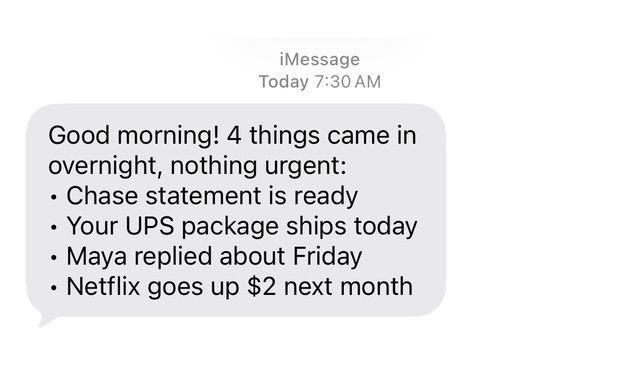
- GravelGood morning! 4 things came in overnight, nothing urgent: • Chase statement is ready • Your UPS package ships today • Maya replied about Friday • Netflix goes up $2 next month
Questions
How do I make sure I never miss an important email?
You cannot make it certain, but three habits get close: filter bulk mail out of your inbox, mark VIP senders and turn on notifications only for them, and sweep unread mail older than a week. Add a reminder for anything with a date, and a follow-up date for anything you send.
What is the best way to prioritize email?
Sort by sender and by deadline, not by arrival order. Put the people who matter on a VIP list, move bulk mail out of the inbox, and turn anything with a date into a reminder. Answer the VIP mail first.
Can AI tell which emails are urgent?
Often, but not perfectly. Gravel looks for signals such as a deadline, a person who matters and a plain request for an answer, and it is tuned to flag too much rather than too little. Newsletters that shout in capital letters never count as urgent, and an email that tries to give the assistant instructions never earns urgency. Gravel is an AI and can still miss one.
How do I follow up on an email nobody answered?
Wait two business days, then reply on the original thread with one line that restates the question and gives a date, such as “Checking on this. Can you confirm by Friday?” Gravel can nudge you when a message that plainly needs an answer is still unanswered after two business days.
Does an AI assistant read all my email?
It reads the mailbox you connect, because that is how it notices what needs you. Gravel keeps mainly the facts it finds, such as a date or an amount, and caches raw email content for no more than 30 days. It starts read-only, and you can ask it what it knows about you and have it forget anything.
Sources
Keep reading
Updated
Hand Gravel
the small stuff.
We’re opening Gravel in small groups. Leave your email and we’ll let you know when it’s your turn.